
Your policy number can be found on your insurance certificate, identification card, or benefits booklet.
Your certificate number can be found on your insurance certificate, if one has been issued. Otherwise, please contact your plan administrator to obtain this information.
If you do not have access to any of these documents, please contact your plan administrator. Our Customer Service representatives are unable to provide this information.
Once your enrolment is complete, your plan administrator will provide you with your insurance certificate, which will include an identification card if you are covered for Health Care and/or Dental benefits. If applicable, you will be able to create an account on the My Humania claims platform, where you can also view and print your up-to-date identification card at any time by following these steps:
1. Once you have logged in to your online account, click on your name in the upper-right corner.
2. Click “My Virtual Identification Card.”
3. Click “Print.”
To change your coverage or information, contact your plan administrator. Note that any family member you wish to add must meet the contract’s eligibility criteria.
You can also update your address as follows:
By email, at adm.coll@humania.ca. If you choose this option, be sure to clearly enter your policy/group and certificate/client numbers, name, old address and new address;
By calling our Customer Service team at 1-800-818-7236, Monday to Friday, from 8:00 a.m. to 5:00 p.m.
To find out who your beneficiaries are, you can contact the Customer Service Centre at 1-800-818-7236, Monday to Friday, between 8:00 a.m. and 5:00 p.m. or email your request to Be sure to clearly enter your policy and certificate numbers, your name and your employer.
To change your beneficiary designation, you must complete and sign the “Designation or change of beneficiary(ies)” form.
You can give it to your plan administrator or mail it to:
Humania Assurance Inc.
1555 Girouard Street West
Saint-Hyacinthe, Quebec
J2S 2Z6
The plan’s coverages are those retained by the policyholder. Participation in the plan is mandatory if you are eligible. You must contact your plan administrator for any changes to your coverage.
Your unique identifier, in HUM00000000000-00 format, is found on your ID card and allows health care professionals to submit claims directly on your behalf. You also need this identifier to connect to the My Humania online portal for the first time.
Be sure to present your ID card with your unique identifier to your professional. If they require assistance to process the claim, they may contact:
You can also pay the full fee at the professional’s office and submit your claim online with a copy of your original receipt for reimbursement.
You have three options to submit your claims:
You can check your coverage through your online account by following these steps:
After logging in to your My Humania account, click “Menu.” Then, under “My Health Care and Dental Benefits,” select “Consult my Protections.”
You have several options:
Depending on the option chosen, you may be prompted to select or enter additional information (e.g., the estimated expense amount).
Click the “Continue to Estimate” button.
The summary of the estimate request will be displayed.
You can also refer to the benefits booklet provided by your plan administrator.
Lastly, you can call our Customer Service team at 1-800-818-7236, Monday to Friday, from 8:00 a.m. to 5:00 p.m.
The limit to reasonable and customary fees is a cost-control measure that is used by each insurer, but whose amounts may vary. This limit is used to prevent the plan from having to reimburse a non-standard fee for a service or item compared to the prices charged by most providers. The limit to reasonable and customary fees is therefore set so that the price charged by a majority of suppliers is fully eligible.
If a supplier charges an amount in excess of Humania Assurance’s reasonable and customary fee limit for a particular service/item, this means that the amount charged is greater than the majority of providers offering similar services. You will be required to pay the difference between the cost charged and the limit to the reasonable and customary charges for the service/item.
1. Once logged in to the My Humania claims platform, click on the purple “Submit a claim for Benefits” button.

2. Complete the required information under “My Claim Details.”
3. Under “Additional Claim Details”:
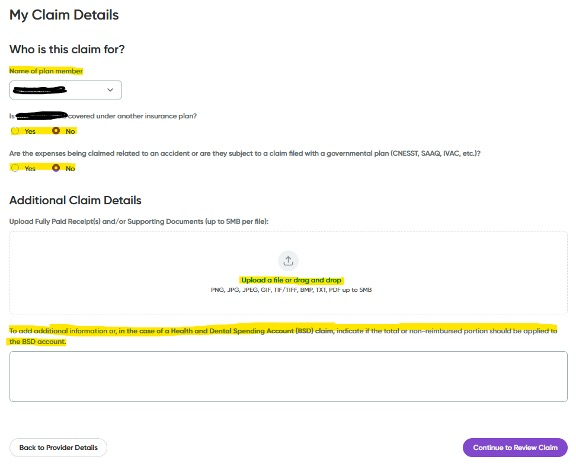
4. Confirm and authorize by checking the legal statement at the bottom of the screen, then click “Submit Claim.”
Your submitted claim will be reviewed by an analyst in our Claims Department. Once processing is complete, you will be able to view its status under “Menu / My Claims / View My History.” You will also receive an email notifying you that your claim has been processed.
You can submit a claim online on My Humania for health care and dental benefits, excluding emergency costs outside your province of residence. If you have travel insurance coverage by Humania Assurance, you can contact customer service directly using the contact information on the back of your ID card.
Please follow these steps:
Sign in to your My Humania account and click your name in the upper-right corner of the page.
Click “My Account Settings,” then “My Login Information.” Select either “Change My Email Address” or “Update Password,” depending on the change you wish to make, and follow the on-screen instructions.
If you have forgotten your password, click “Forgot your password?” on the My Humania home page and follow the instructions to reset your password.
If you enter an incorrect email address or password multiple times, the system may lock your account. A message will appear to notify you. You will then need to contact our Customer Service team at 1-800-818-7236. They can unlock your account after verifying your identity by asking you questions about your account.
Most changes to your personal information must be submitted to us by your plan administrator because they affect the administration of the plan. You must therefore notify your plan administrator of these changes. However, you can update your phone number by following these steps:
1. Sign in to your account and click your name in the upper-right corner of the page.
2. Click “My Account Settings.”
3. Click “My Profile.”
4. Under “Contact Details,” click the purple “Edit” button.
5. Select the phone number type and enter your phone number. You can add another phone number if needed.
6. Click “Save Changes.”
You can do this online by following these steps:
1. Sign in to your account and click your name in the upper-right corner of the page.
2. Click “My Account Settings.”
3. Click “Payments.”
Enter your banking information if you are signing up for the first time, or update your existing information as follows:
To create a claims summary report, go to:
Click “Create Claims History Report”.
You can then select the types of expenses you want to include and the period you need for your tax return. Please note that claims processed before November 1, 2023, are not available in your claims history.
Make sure you have completed, attached and signed (as applicable) all sections of your disability claim:
Keep original documents for your records. Only the original Humania Assurance Standard Authorization is required.
You can submit your disability claim to us:
If you have short-term disability insurance coverage:
If you have long-term disability insurance coverage only:
Following the assessment of your claim, if you meet the definition of disability as well as the other clauses of your insurance contract, benefit payments will begin. Disability benefits are payable following the waiting period stipulated in your insurance contract. Payment frequency depends on your type of disability:
Requests for medical information considered in your disability claim may include:
It is your responsibility to stay in touch with your analyst throughout your disability claim.
You must inform your analyst of any changes to your medical condition throughout your disability claim.
You must also submit all medical (clinical notes, X-rays or specialist reports), financial (CNESST statement) or administrative (medical history form) documents requested by your analyst.
For more information on your responsibilities, refer to the Claimant’s Charter of Rights and Responsibilities.
It is our responsibility to inform you of the steps taken throughout your disability claim and to explain the decisions made.
It is also our duty to keep your personal and medical information confidential.
When you are fit to return to work, we will work with you and your health care professionals to find schedule and task accommodations, if necessary.
For more information on your rights, refer to the Claimant’s Charter of Rights and Responsibilities.
The policyholder must forward group insurance applications to the insurer or its representative within the time limits set out in the group insurance contract. The policyholder is responsible for the accuracy of the information provided during the application. Failure to meet the deadlines may result in the loss of the member’s rights in the event of a claim.
The policyholder is also responsible for deducting premiums and remitting them to the insurer on a monthly basis.
In the event of a claim submitted by a member, the member must provide the insurer with such information as is required for the consideration of the claim submitted.
It is the policyholder’s responsibility to ensure that all plan members and their dependents are eligible for coverage at the time they join. The policyholder must also ensure that this eligibility continues on an ongoing basis as long as members are covered by the group insurance contract. Eligibility standards and criteria are detailed in the contract in effect between the policyholder and Humania Assurance.
It is also responsible for providing members with their certificate of insurance as well as with a copy of the brochure detailing the coverage available to them.
The policyholder also has a duty to inform the members with regard to the group insurance contract. However, it cannot provide advice to the members. It must refer them to their insurer or its representative when a request exceeds its duty to inform.
Watch the explanatory video.
The normal period for submitting an application or a change affecting a member’s file is 30 days. However, this period may vary from one contract to another. The policyholder must refer to their contract in the GENERAL CONDITIONS section under Responsibilities of the policyholder to determine the period that applies. Failure to meet the deadline may result in the loss of the member’s rights in the event of a claim.
The insurer must be notified of layoffs and leave without pay within the time limits set out in the contract, as these situations may impact the member’s benefits and rights in the event of a claim. The deadline is the same as for any notice submitted to the insurer to change a member’s file and is found in the GENERAL CONDITIONS section under Responsibilities of the policyholder.
You must complete and sign the “Pre-authorized Debit Agreement” form and forward it to us with a copy of your void cheque.
Humania Assurance Inc.
1555 Girouard Street West
Saint-Hyacinthe, Quebec
J2S 2Z6
By fax at 450-773-1809
You can contact our Customer Service team Monday to Friday from 8 am to 5 pm., at 1-800-818-7236.
Customer Service, group insurance:
The email address for group insurance Customer Service team is groupservice@humania.ca.
Make sure to clearly indicate your policy numbers and your name.
You will receive a response within 2 to 3 business days.
To submit a health care and/or dental benefits claim:
First, you can complete the claim online.
Alternatively, on the Make a claim page, select the type of claim you wish to make, then follow the steps requested.
The e-mail address is health.claims@humania.ca .
You can send mail to Humania Assurance:
1555 Girouard Street West
Saint-Hyacinthe, Quebec
J2S 2Z6


